Sky-Web
Web Design - Databases - Search Engine Optimisation- Usability Engineering
Home Virus News Info Recent Projects Web Articles Taggart & Wright
Notam Software Reviews
Page updated 16th April 2010.
I had an article published in Sailplane and Gliding, April-May 2007, reviewing various examples of Notam software, in particular software designed for glider pilots. Obviously software undergoes updates and improves with time, and that article will eventually become out of date. Therefore this section is intended to include descriptions of these updates, new reviews of similar products and, after the issue is sold out, a copy of the original article itself. And of course I can expand on other features of the programs without worry about using up too much space in S&G.
For most pilots planning a route cross country, notams are a vital thing to check, but the CAA's official software is notoriously difficult to use and does not provide a visual display of the flight's route and possible problems - a major oversite in their design! This has resulted in several third-party programs being created to give a very much more useful way of examining the notams - on a map background. some of the maps are a simple outline with a few towns marked to help you locate things, others include all airways, BGA turning points, airfields, and such like. Exactly what you'd want to see in other words.
At the present moment my web site is undergoing a complete redesign. So if at times this section looks rather different to the rest of the site or a bit bland, it is because I don't want to continually be changing it to match every small change in the upcoming new design.
The following products were mentioned in the original article, and the links below take you to their sites: -
NotamView v0.8.2 ~~~ NavPlot v0.3.2 ~~~ SPINE v3.7 ~~~ NotamPlot v2.1
The Review
Read the original Notam Software Review article, as a Word doc. As the images in the S&G article were a bit small, these links below should make things a bit clearer for you.
NotamView - setting a task (in dark
blue) with a Notam highlighted (orange and green) and described bottom left.
(Click the image to force the browser to display it full size.)

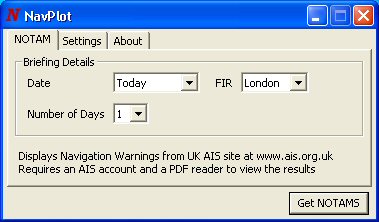
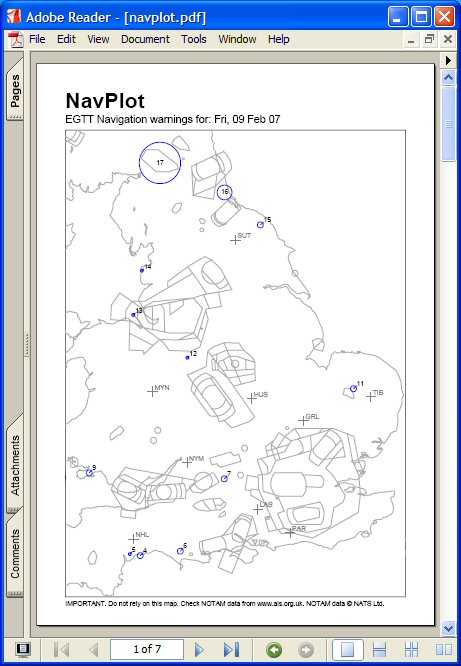
NavPlot - configuration / control panel and the typical output, in Adobe Reader
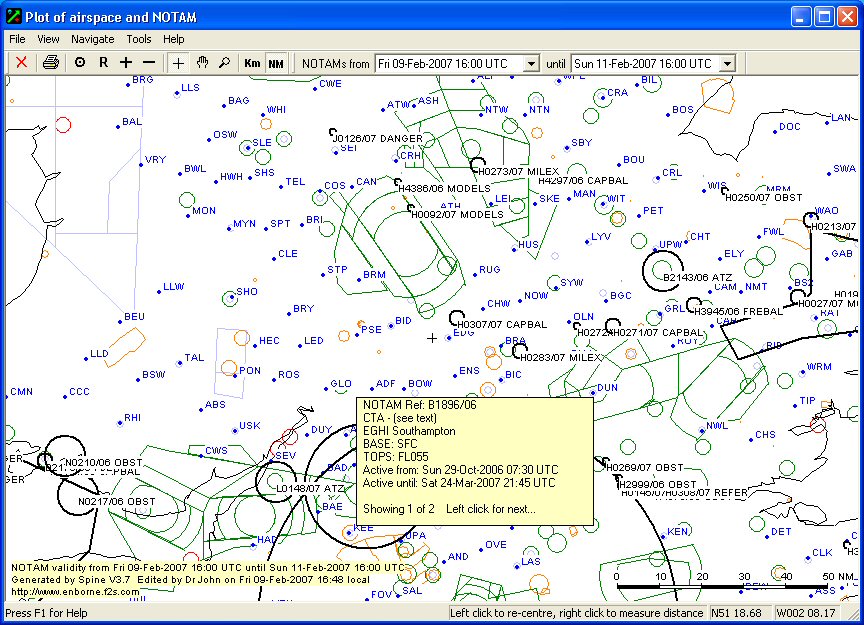
SPINE - the over-crowded interface and the interactive map, showing one of the pop-up info boxes

NotamPlot - setting a task (in green) with a Notam highlighted and described bottom left

These programs in their current versoins get data from EAD, and you usually need a free account with EAD to make the programs work. You can get this free account here.
Updated Products
Well, I have to congratulate NotamView - their latest software update was released one week before the article actually appeared in print, and thus made it instantly out of date. A quick summary of the changes follows, and I will add more when I get a chance to play with it.
Changes to NotamView
Version 0.9.0 was released on 23rd of March 2007. It now includes, in response to many requests (including some from me), the important ability to handle AATs, with the sectors drawn on screen so you can see what problems are in each area. For power pilots , VORs have been added as well, so those who navigate via them can keep track of what warnings they will meet en route. Equally important, the airspace files have been updated, as has the BGA TP list (now the 2007 release).
Okay, I have had a play with NotamView 0.9. The task setting option is now a tabbed view, allowing selection of ordinary tasks and AATs. In both cases you can either just type in the trigraph or, if you cannot remember it, right click in the box and select it from a pop-up window which has a drop-down list of all the TPs. To set the AAT's sectors, just enter the minimum radius (usually 500m, the normal beer can) and the maximum radius. If it is not a circular area, enter the two radials (the order you enter them in depends on where the sector is relative to the track in AND the track direction). When you click on Draw, the task is added to the map, which auto-scales. If you don't like the way the task looks, alter it and click Draw again and it is updated. The pop-up windows are not modal, so you can swap between them when planning the task, and then close them when you are happy.
Zooming in on the map shows the TP names but only when there is enough room to show them without adding excessively to screen clutter. You can choose between trigraph and the full name under options.
SPINE 3.7
I didn't mention in the original review that in SPINE 3.7, when you zoom out of the map view, the number of TPs that are displayed is reduced to prevent the display becoming impossible to read due to screen clutter. This enables you to have a rough idea of where things are, and thus choose the correct place to zoom in on, where upon more TPs are revealed. The same is true if you choose to display ICAO airfileds. The automatic update function has now been tested and shown to work - I have just been prompted in a pop-up to download (automatically) the latest TP list.
See below for more info on Spine 5.6 and 5.7. These has many new and useful features.
Important
The source of notam information used by most such programs changed suddenly in May 2008, with no notification to the software writers. So all the above products suddenly just stopped working. They have now been updated, use the EAD database and work again. Some authors have taken the opportunity to revise their programs, others haven't, so check the version numbers - NotamView has reached V1.0.0 and now uses Java 1.5, Spine is now V4.5, Navplot is V0.4 and NotamPlot is V2.3.
Update 2009
The EAD database has changed the log-in system, again, and all programs stopped working for a while. Why do EAD do this? It just doesn't do anyone any good at all!
Spine has been upgraded to V4.9, and can get through the changed log-in system.
After installing the new version, it worked okay first time.
NotamView, my choice as the best overall, is currently working on getting
through the log-in barrier, while the current version, V1.0.0 still can't
log in.
NavPlot V0.4 can't get in, but a new version, V0.5.1 is now available, which
can. But first, you must register with EAD, as stated on the NavPlot site.
It takes about two minutes to register, and they send you an email with your
username and password, which you then enter into NavPlot. Then it works immediately.
NotamPlot is at V2.4 and has a technical problem at present with some versions
of Java, but they hope to fix it soon. But if you have the correct version
of Java, you simply re-enter your AvBrief registration details, and things
spring to life again.
Update 2010
Usual complaint - EAD have changed their data format, yet again. Most programmers are updating to get round this. If you are repeatedly failing to log in, just set up a new username and password with EAD, free account here. And you might find that your password has been "aged" and so Eurocontrol could lock you out, again.
Spine 5.6
Spine has been undated regularly since the original article was written, and has improved significantly since then. File size is still quite small, at 0.45MB
Firstly, the opening screen has been improved and tidied up a bit (this was
one of my main dislikes back in 2007).
The next major improvement is that on the map/plot screen, the NOTAM details
are now displayed in a side panel. The original design was only useful if
you had a wide screen, and could view the opening screen simultaneously with
the map view, but many users back then didn't have a wide screen. This sidebar
is a great improvement as many clubs run software on cast-off computers with
more normal sized screens. So, now you just click on a NOTAM on the map, or
hover over it for a few seconds, and you can read its details easily. This
is the style of display used by several of the other programs, and I do prefer
it to the separate window the earlier versions used.
By themselves, the above two improvements are well worth having, but more recently SPINE has added task setting as well. To set a task you have to manually enter the tp trigraphs, separated by a comma, and click on update. The task is drawn on the map of NOTAMS, and then you have to manually zoom in to see how close to any area your task takes you. I'd have very much preferred auto-scaling of the map however. (NotamView does offer autoscaling.) Hovering over or near the green task legs gives info about the leg length, how far along the task a point is, and distance to previous and next tps. All useful stuff (suggested by yours truely). Tasks can be saved - its best to name them after the tps involved eg bic-chv-npt-chn-bic for ease of recognition, as each task is in a separate file (so save them all in the same place!).
Overall, I'm using SPINE quite regularly now.
NotamView v1.0.3
As you will see from the version number, NotamView has been updated, with the latest version released in March 2010. Mainly it is small refinements rather than lots of extra features. A change to the way EAD formatted the data required a few changes. Note that if you try to use it and get Error 28 when you try to download the latest Notam data, this usually means that EAD has decided you haven't logged in often enough. So go to their site and create a new user. I hit this problem due to using the club's version a lot with their username, not the version on my own computer with my username, so EAD decided I was now an ex-user. Thanks EAD.
Although I seem to be using Spine more often, I still like NotamView.
NavPlot V0.5.2
A small update occurred in July 2009, to get round the usual bug - EAD. Are
you spotting a trend here with EAD?
It's now a 5.3Mb download.
Updates 2011
Spine 5.7
This was released in late March 2011, but some minor bugs were encountered on doing the update, reported by the author on gliderpilot.net. The program updates then tells you that there is a problem with the database. Below is the author's solution.
"OK. I have a solution to the problem for those of you who have it.
In Windows Explorer, under your user folder, go to AppData/Local/Virtual
Store/Program Files/Spine and delete the contents of that folder.
There is probably a file 2010X.dos or similar in there which is causing all the problems.
On XP, I think the folder names are different (Documents and Settings?), but you should end up at the folder containing that file.
Jeff."
Note that the folder AppData can sometimes be hidden from the user in Vista (and I'd guess in Windows 7 too), but entering appdata in the search box (under the Start Button) will reveal it and a double click gets you on the correct route. I too got the error message, and deleting the 2010x.dos file resulted in the program opening, fully updated.
So what are the changes?
- Changes to support changed BGA Turning Point file format and 4-character codes.
- The full name (where available) for danger areas is now displayed in popups in the plot window. Previously only the "Dnnn" part was shown.
- A couple of new Subject designations have been added to the Q line definition file, and Help has been updated to reflect this.
- In addition, when the Q line definition file is updated, filter settings are reset to their defaults to incorporate any changes.
- There have been minor changes to task editing.
I will soon be adding some reviews of other Notam software that was not mentioned in the original article, so do come back in a week or two's time. This will include some products that may be more suitable to pilots in general aviation, and not just glider pilots.
At a future date I may add new pages covering aviation software in general.